
Before you start
- The Chrome extension installed and an open Travian session.
- The villages you want to configure visited in the game so their information can be read.
- The game’s normal construction requirements, resources and available queue space.
These instructions use the English bot interface. Screens show sample settings; they are not live game sessions.
Read the villages you want to use
Open the relevant village in Travian, then reopen the bot. Under Village Settings, find the village name in the action you want to configure.
If building choices are unavailable, visit that village in the game and reopen the window to refresh its information.
Choose resource fields
Expand Upgrade Resource Fields and enable the villages where you want field upgrades. For each enabled village, select wood, clay, iron and crop according to your plans.
Selections can differ between villages. Ad-based upgrading is a separate optional setting.
Current bot interface
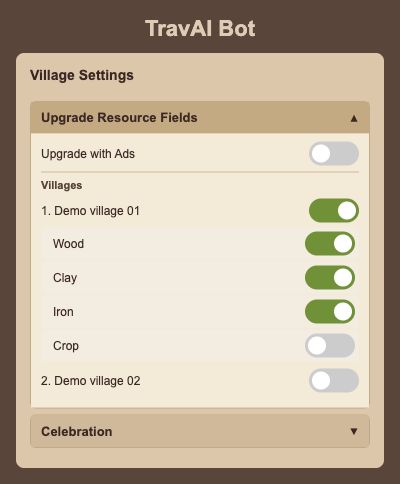
Rendered from the English interface with sample settings. This is not a live game session.
Open the full-size screenChoose buildings and target levels
Expand Upgrade / Construct Building, enable a village and choose the buildings you want the bot to manage. Set the target levels shown beside your selected buildings.
The available choices depend on the village information and the game’s building requirements. The bot still needs the normal resources and construction conditions.
Use automatic development if you want it
The Artificial Intelligence (AI) section contains Automatic Village Development. Enable it if you want that broader development routine; keep your manual field and building selections aligned with your plans.
The automatic pause option is a separate preference in the same section. Review both choices before saving.
Save and review your first run
Press Save, then Start when ready. Use the action history and your villages in Travian to review the work being performed.
Troop training and automatic resource support have separate settings. Follow their guides to add either one to your village routine.
Questions and troubleshooting
Why can’t I select the village’s buildings?
Visit that village in Travian and reopen the bot window. The interface needs its village and tribe information before showing the building choices.
Can villages use different field selections?
Yes. Enable each village under Upgrade Resource Fields and choose the resource types shown for that village.
An upgrade is not happening. What should I check?
Check the selected village and action, the target level, available resources, construction requirements and queue in the game. Make sure you saved the changes and started the bot.