
Before you start
- TravAI installed and your game session open.
- For oasis raids and adventure ads: Safe Mode and a running compatible Mouse Helper. The current helper download is a Windows .exe file.
- For an escort: the relevant troop options read from the Barracks or Stable in the hero’s village.
These instructions use the English bot interface. Screens show sample settings; they are not live game sessions.
Enable adventures
Under General Settings, open Adventure and enable it if you want TravAI to send the hero on available adventures.
The ad-based adventure options are separate preferences. The hero must be available and in a suitable state for the action.
Current bot interface
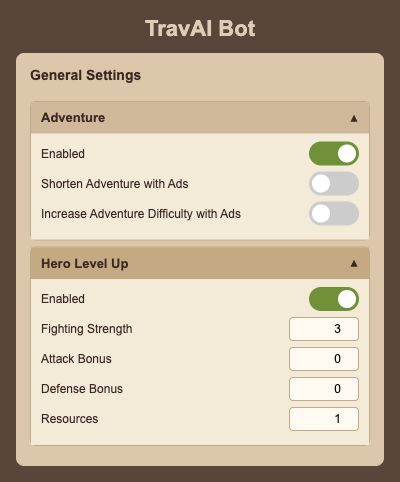
Rendered from the English interface with sample settings. This is not a live game session.
Open the full-size screenChoose adventure advertisement options
In General Settings → Adventure, review the two advertisement options separately. You can use regular adventures without enabling either option.
Adventure advertisements require Safe Mode and a running compatible Mouse Helper. Ads depend on game availability; if an ad is unavailable, a regular adventure may be used instead.
- Shorten Adventure with Ads: choose this if you want to use an available ad to reduce adventure time.
- Increase Adventure Difficulty with Ads: choose this if you want to use the game’s ad-based difficulty increase.
Allocate exactly four level-up points
Open Hero Level Up and enable it if you want automatic point allocation. Distribute four points across Fighting Strength, Attack Bonus, Defense Bonus and Resources.
The configured total must be four before the settings can be saved or a run started. Choose the distribution for your own hero build.
Check the hero’s village and ointment preference
Open Hero Settings. Leave the village setting on automatic detection when appropriate, or select the hero’s village if you need to specify it.
Use Hero Healing Ointment is a separate choice. Review it before you save the rest of the hero settings.
Prepare Safe Mode for oasis raids
Use the installation guide to prepare Mouse Helper, keep it running and enable Run in Safe Mode in TravAI. Oasis raiding requires this mode.
If you plan to send troops, open the relevant Barracks or Stable in the hero’s village, then reopen the bot so the troop choices can be read.
Choose solo hero or an escort
Open Hero Oasis Raid and enable it. Choose Hero only to send the hero alone. To use an escort, choose an available troop type and enter a positive whole-number troop count.
The count shown in the example is illustrative. Set your own selection and count; TravAI considers the hero’s condition when choosing suitable unoccupied oases with animals.
Current bot interface
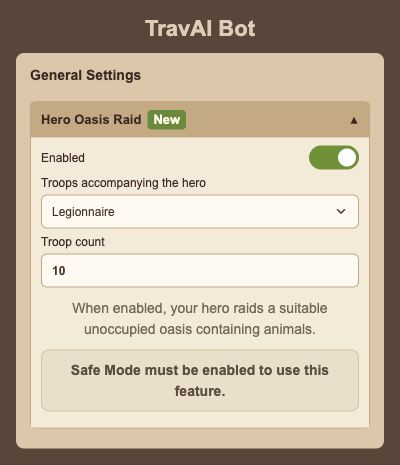
Rendered from the English interface with sample settings. This is not a live game session.
Open the full-size screenSave and check the result
Press Save, then Start. Keep the helper, computer and game session running for oasis raids.
Use the action history and the hero’s status in Travian to review what happened. You can enable adventures, point allocation and oasis raids independently.
Questions and troubleshooting
Why is my point distribution rejected?
When Hero Level Up is enabled, the four fields must total exactly four. Adjust the distribution, then save again.
The escort troop I want is not listed.
Open the relevant Barracks or Stable in the hero’s current village, then reopen TravAI. Check that you are configuring the correct village and choose from the troop options shown.
What count should I enter for Hero only?
Choose Hero only in the troop selector. The escort count field is disabled in that mode; a positive whole-number count is needed only when you select an escort troop.
Why does oasis raiding require the helper?
This feature uses Safe Mode, which requires Mouse Helper. Follow the installation guide and keep that program running while the bot works.