
Farm list automation
Travian Farming Bot: A Different Interval for Every Farm List
Give each farm list its own sending interval. Run selected lists at different rhythms and spend less time repeating manual farming checks.
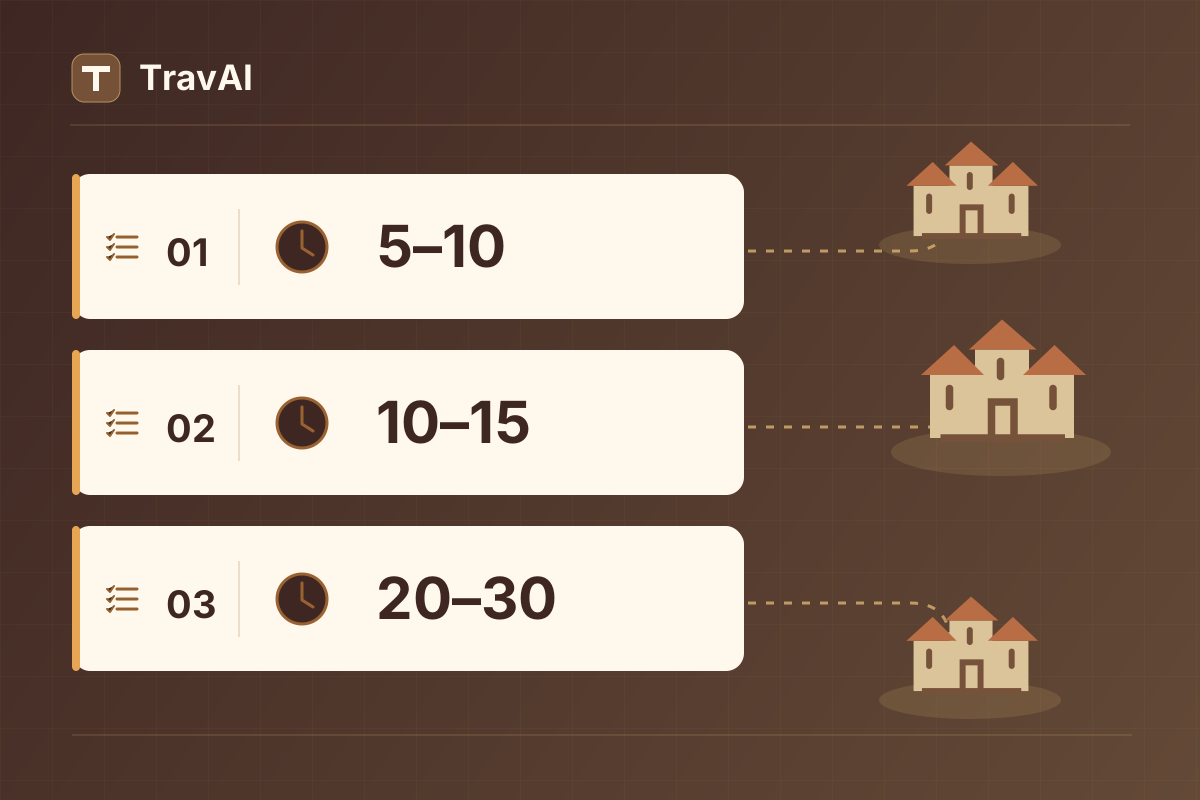
Not every farm list needs to run at the same pace. You may already keep frequently visited targets separate from lists you want to send less often. TravAI lets you carry that distinction into your timing: give each farm list its own minimum and maximum interval.
One list can use 5–10 minutes, another 10–15, and a third 20–30. With this Travian farming bot, you can manage different farming routines without forcing every list to follow one shared setting. You choose the rhythm; TravAI handles the repetitive work of starting the selected lists.
Why set a different interval for every farm list?
Not every farm list on your account has the same purpose. Some contain targets you want to revisit frequently. Others fit a less frequent routine. Your available troops, other expeditions and battle reports can all influence those choices.
Per-list raid intervals let you reflect those differences in your settings. Making one list more frequent does not require speeding up every other list. A list you use less often does not have to determine the rhythm of your entire farming routine.
Farm list automation is useful beyond reducing clicks. It gives you a more precise way to put your own farming plan into practice and reduces the need to remember when to start each list manually.
How custom farm list intervals work in TravAI
Each enabled individual list has minimum and maximum minute fields. TravAI determines the next waiting period within the range assigned to that list. The range for one list can differ from the range for another.
Entering 5–10 sets a waiting range of five to ten minutes for that list. These values do not change troop travel time; they control the timing preference for sending the farm list again. Actual sending can also be affected by game conditions and other work the bot is carrying out.
The current interface accepts 1–60 minutes, with the minimum no greater than the maximum. You can also set both fields to the same value to choose a single minute value.
An example with three different farm lists
This example shows how separate intervals can fit one Travian account:
| List | Example purpose | Interval (min) |
|---|---|---|
| List 01 | Existing targets you want to revisit more frequently | 5–10 minutes |
| List 02 | Targets you want to send to at a moderate frequency | 10–15 minutes |
| List 03 | Targets you prefer to visit less often | 20–30 minutes |
These are illustrative settings. Choose intervals for your own lists using your reports, army availability and farming plan. TravAI does not decide which targets belong in these example categories; it manages the lists you select using the timing preferences you provide.
The useful difference is being able to make a deliberate choice for each list. As your account grows or a list’s purpose changes, you can adjust that list without changing every other interval.
How to configure separate sending intervals
Once your farm lists already exist in Travian:
- Open the relevant farm-list pages in the game and check that TravAI has read the list names.
- Open Start Raid List in TravAI.
- For a routine based on individual lists, leave Enabled under Start All Lists off.
- Enable the lists you want under Individual Lists.
- Enter a minimum and maximum value in each list’s interval fields.
- Press Save, then Start when you are ready to run the bot.
Follow the Travian farm list automation guide for the interface steps. Save stores your choices; Start runs the bot. Keep your computer, Chrome and game session open during operation.
Individual lists versus Start All Lists
Start All Lists is the option for running an all-list routine with a shared interval. Individual Lists lets you choose specific lists and give each its own minimum and maximum times.
If your intention is to use only per-list timing, keep the shared start option off and enable the required individual lists. That makes it easier to follow the routine you have configured and understand which settings control each list.
Filter Losses is separate from the timing choice. In the current interface it is a shared setting, rather than a separate loss filter for each list.
Less manual checking, more control over your routine
The practical value of a Travian raiding bot is reducing repeated trips back to the same farming screen. With TravAI, you decide which lists should run and how frequently each should become ready for another send. You can then focus on reports and strategy instead of remembering every list’s timing.
If you are allocating troops to your lists, explore the options in the troop training guide. For another way to include your hero in farming, read the article on hero oasis raids.
Custom farm list intervals do not automatically make targets more profitable. They give you more flexibility to apply your own plan. Review reports and adjust a particular list when needed, without rebuilding the entire routine.
Frequently asked questions
Can every farm list really use a different interval?
Yes. Enable the individual lists you want to run, then configure the minimum and maximum fields under each one separately.
What raid intervals does TravAI support?
The current interface accepts one to sixty minutes. Set the minimum and maximum to the same value if you want to choose a single minute value.
Does TravAI create new targets or farm lists for me?
This feature uses the existing farm lists you create in Travian. You prepare the targets and list contents in the game.
How can I get started?
Get the latest TravAI package from the installation page. Request a free trial using the WhatsApp button below and try separate sending intervals with your own existing farm lists.
Current bot interface
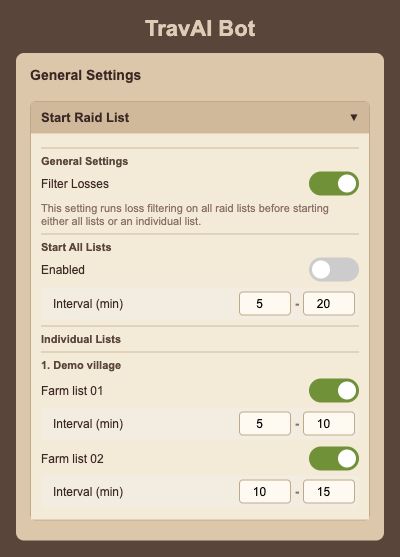
Rendered from the English interface with sample settings. This is not a live game session.
Open the full-size screenGive each farm list its own rhythm.
Request a free TravAI trial on WhatsApp and try separate sending intervals for your existing farm lists.
Try it Free